
Identify the toolchain from the device
ConsoleTuner pairs Titan One with Gtuner Pro and Titan Two with Gtuner IV. The Titan One language reference explains that much of its syntax comes from C and that the compiler translates source into bytecode for the device. That reference is useful for understanding an older project. Its platform details describe the device named in the manual.
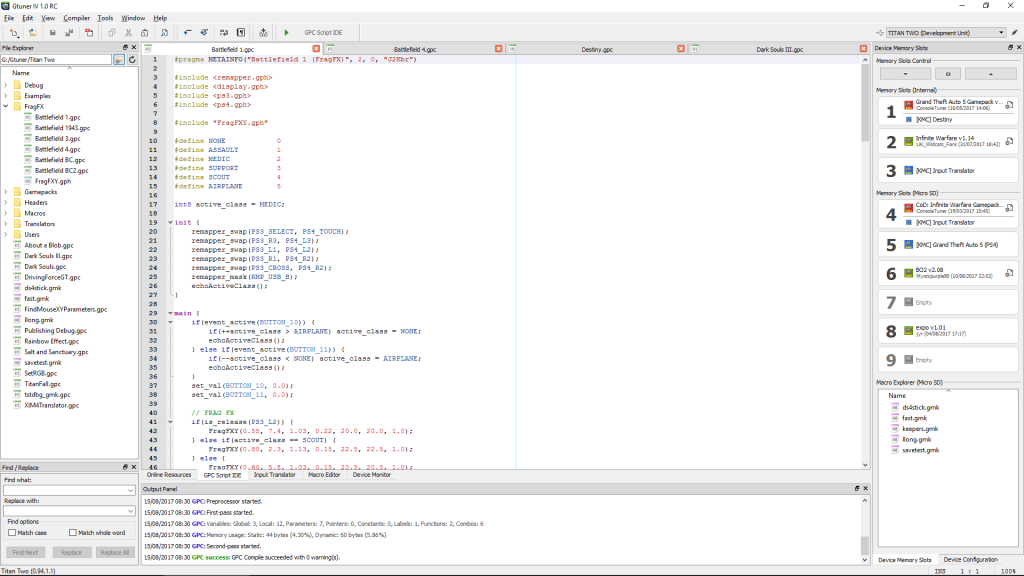
The Gtuner IV overview explicitly names its integrated GPC2 compiler. A guide that describes a Gtuner Pro plugin or shows a Titan One interface is a clue to read it as legacy material when you are working with Titan Two.
Read compatibility as a separate layer
The Titan Two release notes describe a compatibility header for Titan One code. Use that information to understand a source file that includes titanone.gph. A compiler accepting the source does not establish that the same controls, attached devices or settings behave identically in your particular setup.
As an illustrative documentation test, compare a snippet whose README names Gtuner Pro with a Gtuner IV project that includes titanone.gph. The first belongs with the Titan One reference. The second calls for Titan Two release and compatibility information in addition to the original source. The same .gpc extension can apply to both.
Record compile and runtime compatibility separately
When you have permission to examine source, open a copy in the documented editor and record whether it compiles, which compatibility headers it resolves and the first diagnostic if it fails. A successful build verifies the compiler accepted that source with those dependencies. Test the mapped controls separately if you need evidence about their behavior on a particular controller and output protocol.
Sources
Titan Two AI publishes these guides independently. ConsoleTuner makes the Titan Two device and Gtuner IV.