
Match the hardware and editor generations
Read the model label on the adapter and the application name in the open program. ConsoleTuner identifies Gtuner Pro as the Titan One application and Gtuner IV as the Titan Two application. Now compare those two names against the original guide. The manufacturer’s Gtuner Pro overview names the Programmer Panel, while its Gtuner IV materials describe a different workspace. Older posts often shorten both names to “Gtuner.”
The picture of the adapter and the editor screenshot answer different questions. The first identifies the hardware. The second identifies the environment in which the author’s instructions were recorded. Record both when the guide asks you to click a menu you cannot find.
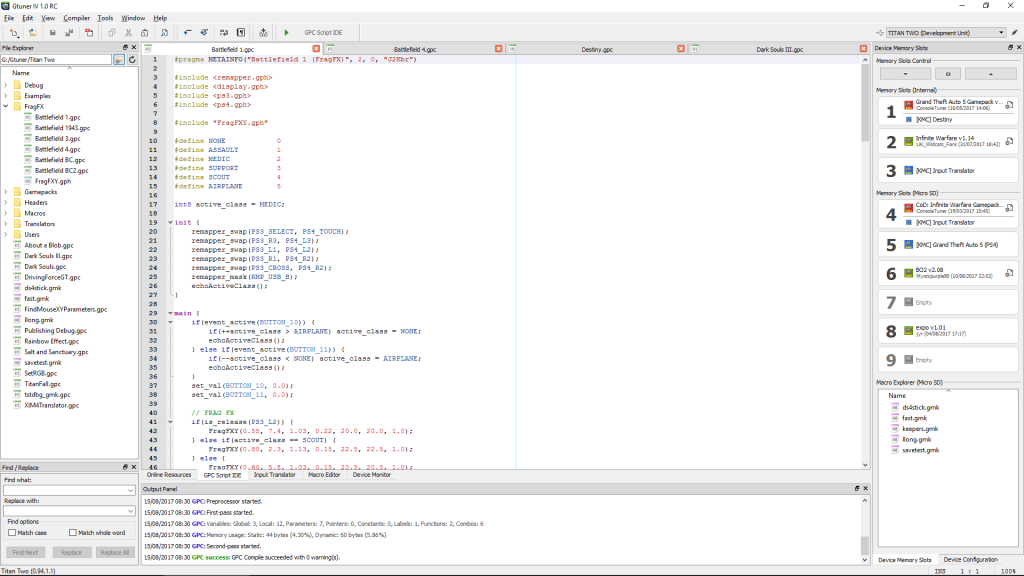
Worked compatibility check without loading a profile
In this illustrative worksheet, the adapter label is Titan Two and the installed application is Gtuner IV. An old tutorial shows Gtuner Pro and names Titan One in the resource notes. Mark the documented target as Titan One. The direct setup steps in that tutorial belong to the older environment. Now consider a file advertised only as “Titan” with a GPC filename. Mark its target as unknown until you find the original author’s compatibility notes.
A third entry might explicitly name Titan Two but give a minimum firmware or editor version. Record that requirement as a separate check. The original target, compiler requirements and profile revision each carry more evidence than a shared filename.
Use release notes to resolve a version question
Write down the device generation, Gtuner version, firmware version, original resource link and the resource revision. Look for the stated requirement in ConsoleTuner’s release notes or the author’s changelog. Those notes document changes to compiler and compatibility features across releases. If the author provides an explicit port for the newer device, evaluate the documentation for that port as a separate resource.
If you are investigating a loading error, preserve the original message verbatim alongside your worksheet. This helps a maintainer distinguish a generation mismatch, a missing dependency and an unrelated connection problem. The worksheet answers whether a document applies to your setup. Publisher rules for using any profile are a separate check.
Sources
Titan Two AI publishes these guides independently. ConsoleTuner makes the Titan Two device and Gtuner IV.