
Decide which problem the adapter would solve
For a button swap on a controller that already works, check the game and console remapping settings first. An adapter becomes relevant when the controller needs a supported crossover connection or when you want a reusable translation profile across supported setups. Write down the exact controller model, console, game edition, and the one behavior you need to change.
List extras separately. Basic input, headset audio, motion controls, vibration, and touchpad behavior can have different support requirements. If one of those features is essential, check it on the precise pairing before using a general compatibility claim to choose a device.
Identify the controller, console, and PC paths
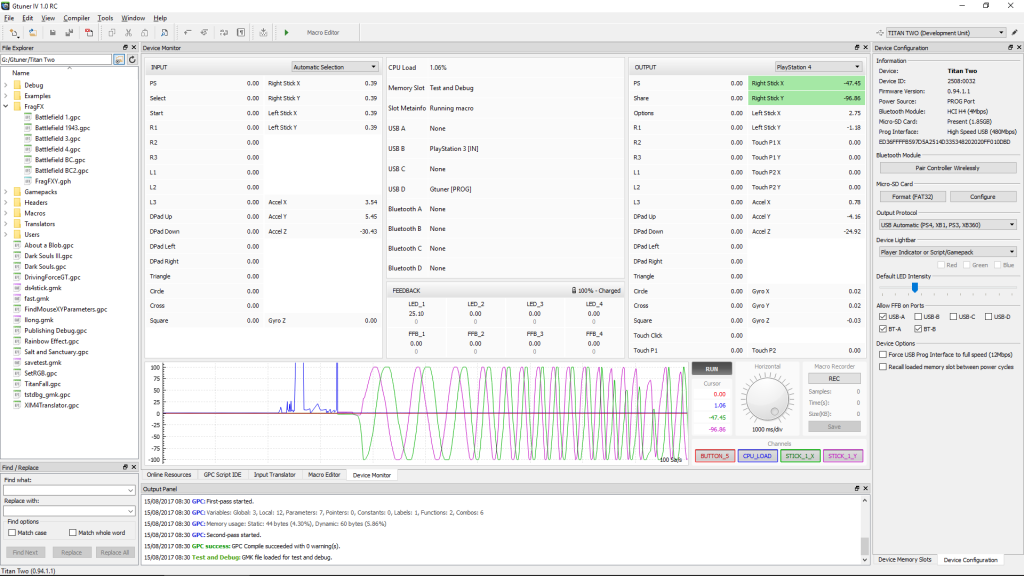
The front input ports accept supported peripherals. OUTPUT links Titan Two to the gaming system. PROG links the adapter to the computer running Gtuner IV. The app configures the device and manages work such as Input Translators, scripts, and macros. A capture device, if needed for a separate video project, follows its own path into the host computer.
ConsoleTuner’s basic connection guide shows an original controller on INPUT-B for authentication and some controller-specific features on supported systems. Check the instructions for your system before choosing that arrangement. For a wired baseline, start with known data cables. The optional Bluetooth module and external storage address specific setups and can be considered after the required connection is clear.
Run a five-minute acceptance test
Test the controller directly in an offline menu. Make five direction presses, five confirm-and-back pairs, and one slow sweep of each stick followed by release. Repeat the same sequence through Titan Two with optional profiles disabled. A pass means that each required button responds once, each stick returns to its resting behavior, and the controller remains recognized for the whole sequence.
If headset audio is part of the requirement, add a separate playback and microphone check to both passes. For an illustrative decision, a setup that passes every button check but loses the required headset path meets the input goal only. A successful navigation check by itself cannot settle the audio requirement.
Keep a record that distinguishes supported from tested
Record the two device models, connection types, Gtuner IV and firmware versions, selected output protocol, and the functions you actually tried. Mark any optional feature as untested until you try it. This gives you a baseline to return to if you later add a translator, switch to wireless, or change the game settings.
Sources
Titan Two AI publishes these guides independently. ConsoleTuner makes the Titan Two device and Gtuner IV.