
Reproduce the movement with the controller connected directly
Choose an offline training area with a fixed view and stand clear of other moving objects. Use a single controller. Keep its connection type, camera sensitivity, deadzone, and game mode fixed wherever the setup permits. Put it on a stable surface for 15 seconds, move the right stick gently left and right, then release it and watch for another 15 seconds.
Write down the direction and whether the camera moves at rest, only after release, or only in a particular scene. Repeat twice. If it happens with the controller connected directly, first investigate the controller or the game settings. A second controller in the same conditions gives another comparison.
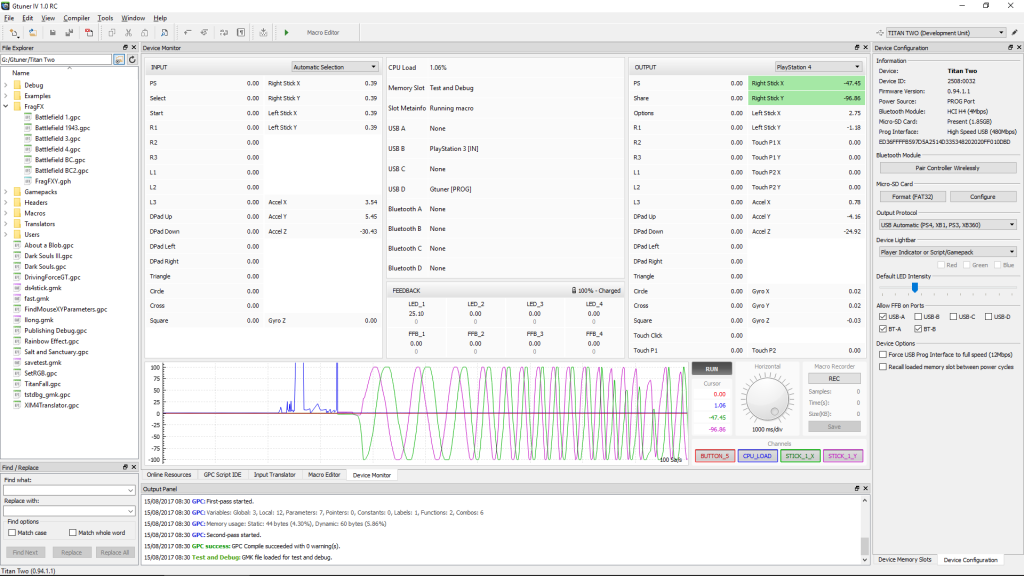
Compare resting input and output in Device Monitor
Connect through Titan Two with optional scripts, macros, and translators disabled. Open Device Monitor in Gtuner IV and locate the corresponding right-stick axis on the input and output sides. Repeat the same rest, move, and release sequence. Keep other peripherals disconnected where your console connection permits so they cannot supply a second input.
If you are diagnosing a configuration you already control, compare the neutral setup against that one configuration in the same local test. Record the resting input, resting output, and screen behavior separately for each pass. A screenshot of Device Monitor can show the difference between its input and output fields, while the record establishes which configuration was active.
Use the three observations to choose the next check
Illustrative result one. The camera drifts with a direct connection and the adapter shows an offset on both the input and output sides. Recheck the same axis with a second controller. Illustrative result two. Direct and neutral passes are steady, but the output moves with one configuration while the input stays centered. Inspect that configuration and leave it inactive while you isolate the source.
If both values look steady while the camera moves, check the game camera behavior, input mode, and any other source the game can read. Save the slot name, output protocol, version, and smallest repeatable sequence for a support request. The monitor helps locate the stage that changed. It cannot identify the cause of every on-screen movement.
Sources
Titan Two AI publishes these guides independently. ConsoleTuner makes the Titan Two device and Gtuner IV.