
Identify the three parts of the signal path
The physical controller generates a button or stick value. The adapter can pass it through or transform it according to the loaded work and its settings. The game then decides how to interpret the outgoing report. A camera movement, animation or simulated accuracy effect is calculated by the title after it receives the input.
A Gamepack, a community script and an Input Translator are different kinds of Gtuner IV work. When reading a description, note which one actually claims to change the signal and where that work is loaded. The product feature list describes what the platform supports. The documentation of the particular work explains what it does.
Follow one neutral input through Device Monitor
For a bench test with Titan Two and a supported controller connected, keep scripted work inactive and open Device Monitor. Choose an ordinary directional-pad button that is easy to identify in the monitor. Press it once, hold for about a second, then release. Repeat twice. Record which input row and which output row change and whether both return to their resting states.
The expected pass-through pattern in this test is idle, pressed, idle on the corresponding rows. This is an expected example and depends on the selected protocol and mapping. If the output row has a different label, check the protocol and remapping settings before assuming the adapter generated a new action. A button or menu input makes the comparison possible without entering a match or running an automation profile.
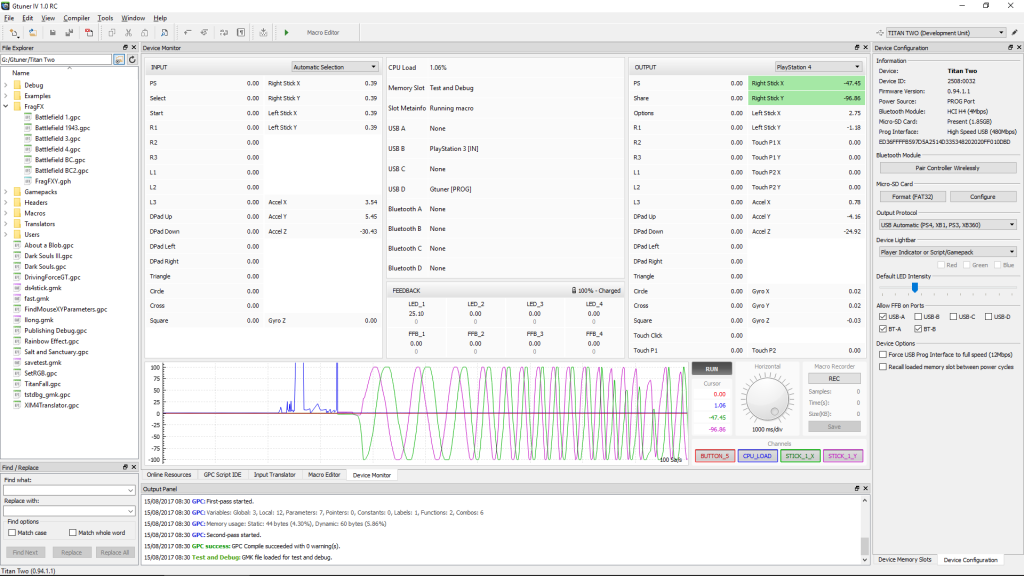
Connect the observation to the claim
If a work claims to modify controller output, a trace can document the outgoing signal for the configuration shown. A trace alone cannot establish the amount of camera movement in a particular game. Look for the game version, input mode and response settings before comparing a signal screenshot with footage. This keeps adapter behavior and in-game results comparable without treating one as evidence for the other.
Compatibility documentation covers whether the listed parts can communicate. Publisher or event rules determine which input changes are permitted in play. Use the appropriate source for each question.
Sources
Titan Two AI publishes these guides independently. ConsoleTuner makes the Titan Two device and Gtuner IV.