
Record the slot before returning to neutral
Start with the setup where you already observed the problem. Close the game and perform the check on a bench using one controller. Record the slot number and the work shown for that slot, then return to your known neutral setup with programmed work inactive. Some profiles expose feature switches, while the device still has a programmed work selected. Keep those two states separate in your notes.
Leave the controller untouched for five seconds. Repeat the observation after reopening Gtuner IV or reconnecting the device, keeping the cable and controller fixed. Note the slot shown after reconnection. This checks whether the state you expect after deactivation is also the state you see after restarting the connection.
Read idle input and output after deactivation
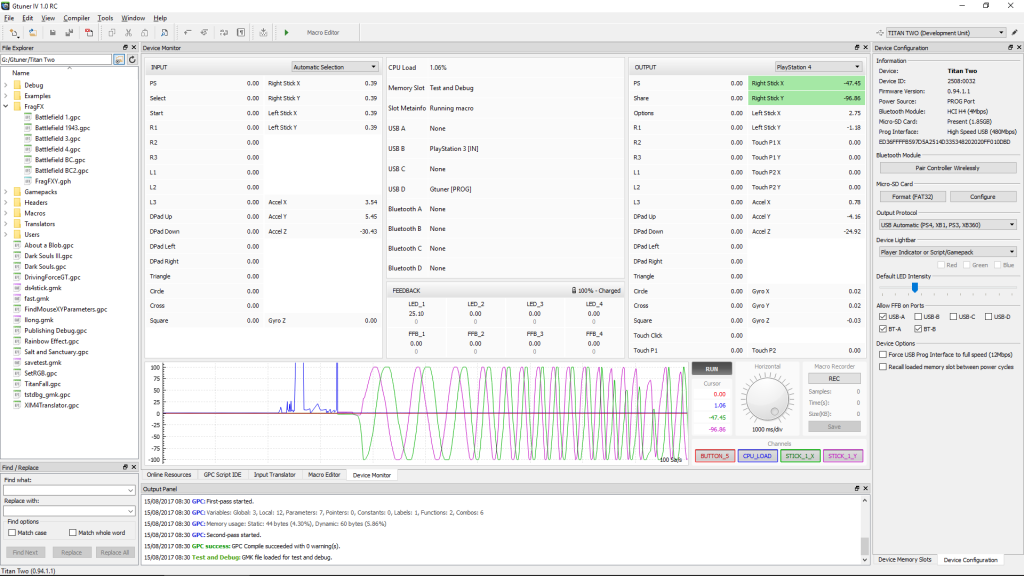
ConsoleTuner documents Device Monitor as a view of what Titan Two receives and sends. Open it with the device connected and select the field related to the reported symptom. Observe the input and output columns together for the same five-second window after each transition. If a difference appears only briefly, record when it begins and ends relative to the slot change.
Record whether the difference was present immediately after switching, after reopening the software or after reconnecting the device. A single screenshot establishes what the monitor displayed at that instant. The sequence of observations establishes which transition matters.
Worked example of a fault report
In an illustrative report, idle input and output match immediately after deactivation. After reconnecting, the monitor shows a difference and the old slot is selected again. Record the slot selection on reconnect as the first changed condition. Return to neutral and repeat. If the selected slot remains inactive but the difference recurs, report the firmware version, output protocol, field name and exact transition to support.
If both columns stay steady through all transitions, keep the neutral setup for a separate check of the game’s camera settings or recording. Keep the bench observation and the game observation in separate lines of the report. Check the publisher’s rules before using an input modification in online play.
Sources
Titan Two AI publishes these guides independently. ConsoleTuner makes the Titan Two device and Gtuner IV.