
Distinguish the adapter from the program
A controller connected to Titan Two produces input reports. The adapter sends output reports to the system using its selected protocol. ConsoleTuner documents programmable slots that can change this behavior. The label on the hardware does not identify which work, if any, was programmed into an individual unit.
Gtuner IV also has a separate computer vision feature for host-side video analysis. A capture source and its associated software are different components from the USB controller connection. A working controller link does not tell you whether a video source is present or a host program is running.
Run a five-tap test in a local menu
Use a local menu with enough items to make a double step obvious, or a controller diagnostic screen. Connect one controller directly. Tap the down direction five times, allowing it to return to rest between taps. Count how many taps move one item and how many move two. Then hold the direction once and record whether the game itself repeats a held input. Keep that observation separate from the five taps.
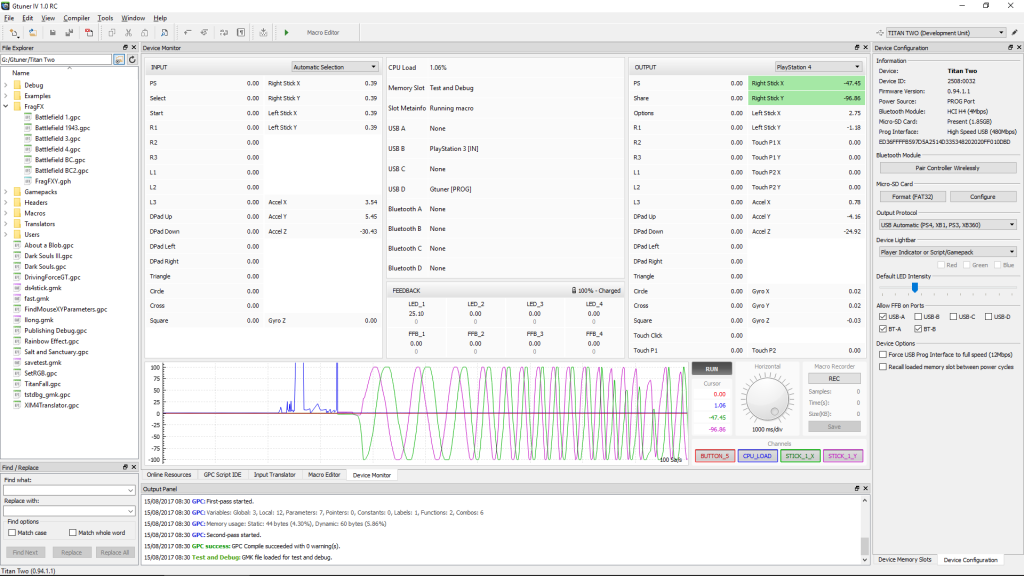
Repeat the five taps through Titan Two with no script or translator active. Keep the same controller and menu. With a Titan Two connected to Gtuner IV, use Device Monitor to compare the same control on the input and output sides. Use a single press and release to identify the relevant entry before trying the full sequence.
Interpret the first layer where the result changes
In an illustrative result, the direct and neutral-slot runs each show five single steps. With a known profile already active, two of five taps produce an extra output transition without a matching input transition. The trace narrows the investigation to the configured path and leaves the responsible feature unconfirmed.
If the input itself toggles twice, repeat the direct test and check whether a second attached device shares that control. If the monitor shows one output transition but the game repeats the action, reproduce it in a second local menu. Save the tested control, active slot, and whether a host app was open, so you can reproduce the exact conditions later.
Sources
Titan Two AI publishes these guides independently. ConsoleTuner makes the Titan Two device and Gtuner IV.